LangChain Architecture: Building Production-Ready LLM Applications
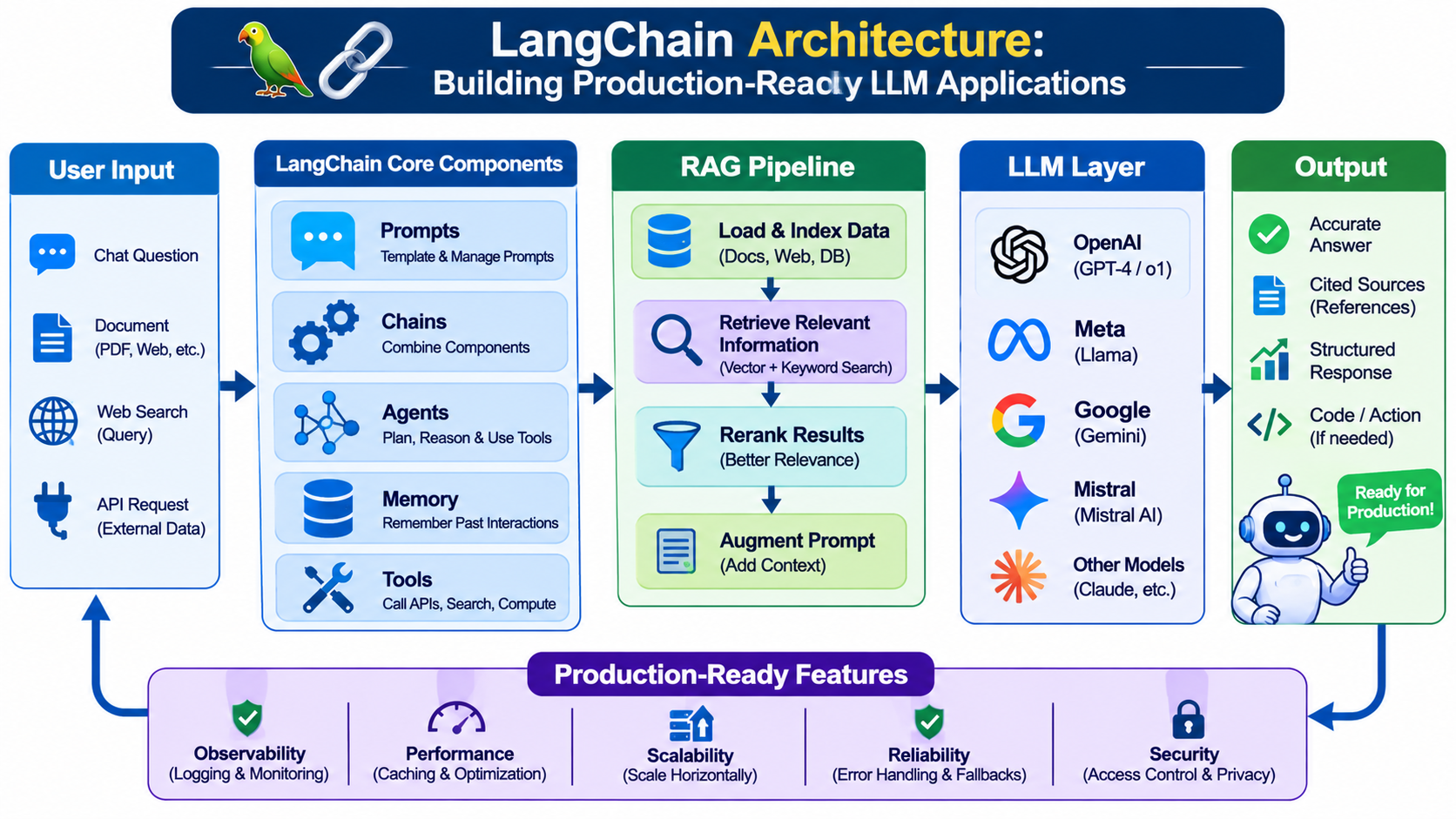
Introduction
Building an LLM application involves more than sending a prompt to an API and displaying the generated response.
Production applications need model integrations, prompt management, data retrieval, tool execution, structured outputs and error handling.
LangChain provides a framework for connecting these components into reusable AI application workflows.
Core Components of LangChain
1. Models
LangChain supports integrations with different model providers, allowing developers to build applications using different LLMs.
2. Prompt Templates
Prompt templates make prompts reusable and configurable.
Instead of manually constructing prompts throughout an application, developers can define structured templates with variables.
3. Output Parsers and Structured Outputs
Applications frequently require predictable output formats.
Structured output capabilities help convert model responses into validated formats such as JSON objects matching defined schemas.
4. Document Loaders
Document loaders connect applications to external information sources, including PDFs, websites and other supported data formats.
5. Text Splitters
Large documents can be divided into smaller chunks before embedding and indexing.
6. Retrievers
Retrievers provide an abstraction for searching relevant information from external knowledge sources.
7. Tools
Tools allow models and agents to interact with external systems, APIs and application functions.
Examples include database queries, web searches and internal business operations.
Understanding LangChain Expression Language (LCEL)
LCEL provides a declarative way to compose components into processing pipelines.
For example, an application can connect:
Prompt → Model → Output Parser.
The same approach can be extended to retrieval-based workflows.
This makes it easier to compose reusable components and reason about the application pipeline.
LangChain Agents
Agents extend traditional LLM workflows by allowing a model to select and invoke tools based on the task.
For example, a customer-support agent might:
Understand the user's question.
Search a knowledge base.
Retrieve an order using a tool.
Evaluate the available information.
Generate a response.
Tool execution should always be governed by application-level validation and permissions.
LangChain vs. LangGraph
LangChain is useful for model integrations, tools and agent abstractions.
LangGraph provides lower-level orchestration for more complex stateful workflows involving explicit control flow, persistence and human intervention.
They are complementary rather than competing technologies.
Conclusion
LangChain helps developers build modular LLM applications without implementing every integration and workflow component from scratch.
However, production readiness still requires robust testing, monitoring, security, evaluation and careful control of external tool execution.